Skip to content

Windows & Android · Direct download

Tools for running many accounts.

Fingerprint automates your Facebook Marketplace listings, Marketplace Companion lets you control it from your phone, and Stealth Browser keeps each account in its own browser profile.

Productivity

Fingerprint

Facebook Marketplace listing automation for Windows.

Fingerprint helps sellers post and manage Facebook Marketplace listings across many accounts from one dashboard. Set up your products once, choose how many accounts to run, and let it work through the listings for you. One installer for Windows, with no Python or other software to set up. On first launch you enter your name and email, and access is unlocked once it's approved.

Key features

  • Many accounts at once

    Every account runs in its own browser profile, with its own proxy and saved login.

  • Posts listings for you

    Fills in titles, descriptions, prices, categories and photos from your product library, and rotates the variations.

  • Built for batches

    Queue accounts, set how many listings each one posts, and reorder or remove accounts while it runs. If one listing fails, the rest carry on.

  • Scheduled runs

    Schedule runs so your listings go out when you choose.

  • Picks up where it stopped

    Close the app or lose your connection mid-run and Fingerprint carries on from where it left off.

  • Works with your browsers

    Use Chrome or Firefox, or connect an anti-detect browser such as Stealth Browser.

Technical specifications

Version0.10.1
File size59.9 MB
Platforms Windows
CompatibilityWindows
Last updated
SHA-2563c842bdc7967c3651c80d964016fbca7283e0f09455e4d6a79dbcdc74c8b5b2e
Utilities New · Android app

Marketplace Companion

Control Fingerprint from your phone, from anywhere.

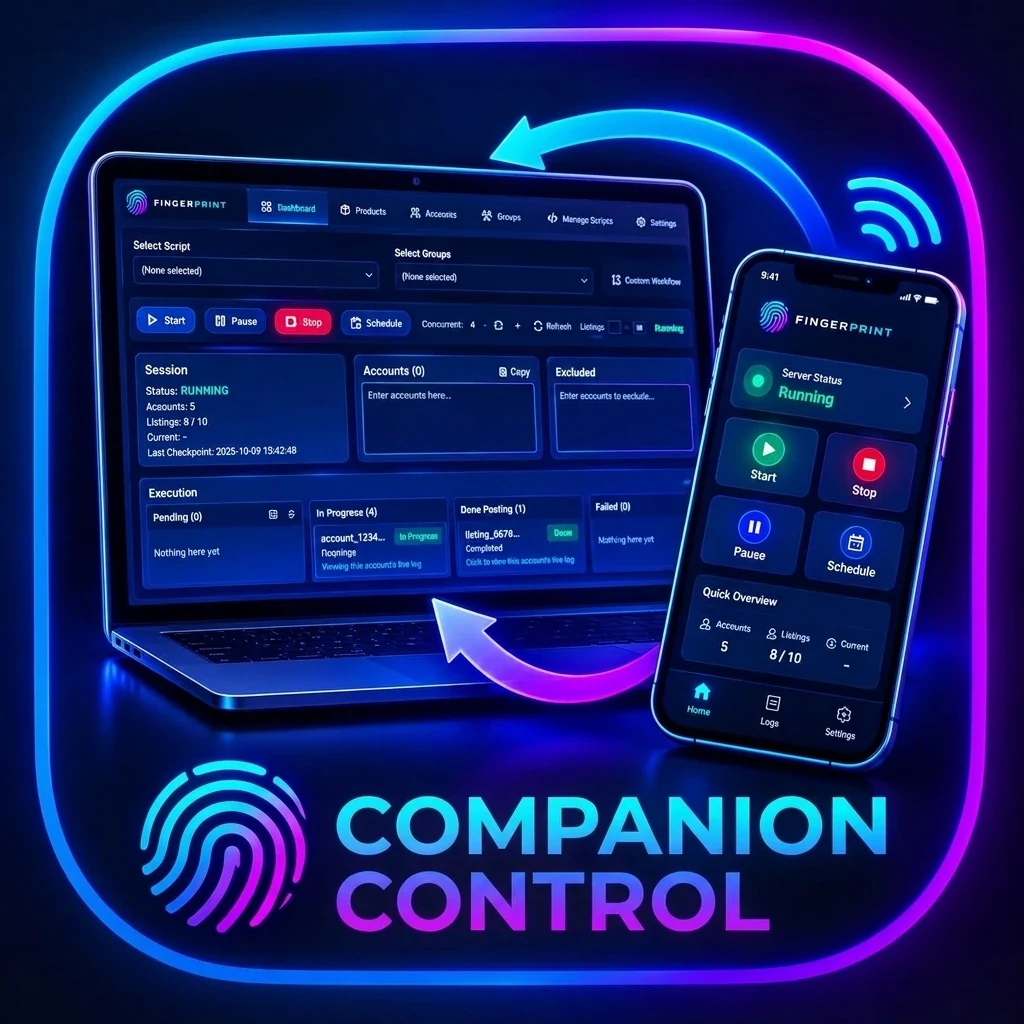
Marketplace Companion is your Android app for controlling the Fingerprint desktop app from your phone, from anywhere. Start, pause and stop your runs, follow the live board, and wake your PC when you need it, all without being at your desk.

Marketplace Companion: the Fingerprint dashboard on a laptop and the Android app on a phone, linked by arrows

Key features

  • Run the Dashboard remotely

    Pick a script, groups or a Custom Workflow, products, browser count, listings and excluded accounts, then Start, Pause, Continue or Stop. Follow the live board (Pending, Running, Done, Failed), the session and your PC's log.

  • PC power control

    Close the Fingerprint app or put your PC to sleep. Set a wake-up time, or choose “wake in N minutes”, and the PC wakes up by itself and opens Fingerprint.

  • Wake-up notifications

    Your phone buzzes with “Your PC has successfully woken up” whenever your PC wakes.

  • Several PCs

    Each PC appears in the Remote tab under its own name, with a green or red status dot.

How it works

  1. 1

    Create a PC Key

    In the phone app, open Settings → PC Key and create your key.

  2. 2

    Add it to each PC

    On every PC, open Fingerprint, go to Settings → Apps → Phone Connection, paste the key and set a 4-digit PIN.

  3. 3

    Connect and control

    Your PC and your phone both connect to our server, Marketplace Cloud, over HTTPS. The PC sends its status there, and the phone sends commands, which the PC carries out.

Built to be safe

  • Start, Close app and Sleep need your PIN.
  • Your PC refuses commands while a dialog or the Settings page is open on it.
  • The phone can never see or change passwords, cookies or accounts.

Technical specifications

Version1.0
File size23.7 MB
Platforms Android
CompatibilityAndroid 7.0 or newer
Last updated
SHA-256ffa2bd052ddb4d1be4253d833c6a6ebba66f1fc8e0593d66314f324c5b6ea5c0
Utilities

Stealth Browser

Anti-detect browser and profile manager for Windows.

Stealth Browser is an anti-detect browser for Windows. Keep each of your accounts in its own browser profile, and connect it to Fingerprint to run your Marketplace listings across them. Install it in a few clicks and start creating profiles.

Key features

  • Separate browser profiles

    Keep every account in its own profile, so logins and sessions stay apart.

  • Works with Fingerprint

    Connect Stealth Browser to Fingerprint to post your listings from separate profiles.

  • Simple Windows install

    One installer. Download it, run it and start setting up your profiles.

Technical specifications

Version0.3.6
File size73.3 MB
Platforms Windows
CompatibilityWindows
Last updated
SHA-256fe976674cfe854f19e91db007cf832121641be8ddc89931c8a8520ab154af64f

Help center

Frequently asked questions

  • On Windows, download the installer, open it and follow the steps. Fingerprint needs no Python or other software. On first launch Fingerprint asks for your name and email, and access is unlocked once it has been approved.